Word Carnival - All in One
- 4.6
- Rating
- 500.00K
- Installs
- Free
- Price
 Analysis by App-foxy
I found Word Carnival - All in One easy to understand within a few minutes: it brings several familiar word-game formats into one place instead of asking me to install separate apps for searching, connecting, and crossword-style play. That simple idea is its main appeal. I can move from a relaxed vocabulary puzzle to a more focused challenge without changing apps, which makes it a handy companion for short breaks.
It is a free word game from HI STUDIO LIMITED, aimed at Everyone and available for devices running Android 7.0 or later. The game has built a strong audience, with an average rating of 4.6 from around 22 thousand ratings and more than 500 thousand installs. Those figures suggest that it has found a comfortable place among casual puzzle players, although popularity alone does not guarantee that its particular mix of modes will suit everyone.
How Word Carnival feels during everyday play
I find the everyday appeal comes from choosing a puzzle that fits the time and attention I have, rather than forcing every break into the same format. A useful habit is to decide before opening the game whether I want a quick scan or a more deliberate round; that small choice can make the collection feel purposeful instead of like endless browsing. Next, I look at how its feedback keeps a session moving.
You May Also Like

 Blood Strike: 2.5 Anniversary
Blood Strike’s Loadouts Turn Every Drop Into a Tactical Gamble
A close look at Blood Strike’s custom loadouts: how fast access to signature weapons reshapes its battle royale rhythm, rewards preparation, and narrows the gap between fights.

 Pandora - Music & Podcasts
Pandora’s Music Is Easy to Start, but Harder to Recover
Pandora’s strength is its low-effort path from a seed to a station. Its weak spot is how much confidence it asks you to place in connection, setup, and quiet recovery.

 8 Ball Pool
8 Ball Pool Is Built on Rivalries, Rematches, and Routine
A close look at the rivalries, rematches, shared routines, and unanswered safety questions that turn a quick pool match into a persistent mobile community.

 Samsung Music
Samsung Music’s Quiet Strength Is Playing What You Already Own
Its reach comes less from spectacle than from dependable access to a personal library. That simplicity is both the app’s strongest retention engine and its ceiling.

 AccuWeather: Weather Radar
AccuWeather Review: A Quick, Clear Forecast for Everyday Decisions
For everyday plans, the best forecast is the one you can understand quickly. AccuWeather makes rain timing, radar, and local conditions easy to act on, with a few trade-offs.

 Hill Climb Racing
Why Hill Climb Racing Still Turns Crashes Into One More Run
A tiny car, a bumpy hill and one more upgrade: Hill Climb Racing keeps resurfacing because its simple chaos makes every near-miss feel personal.
More From Our News Desk



A quick start for short sessions
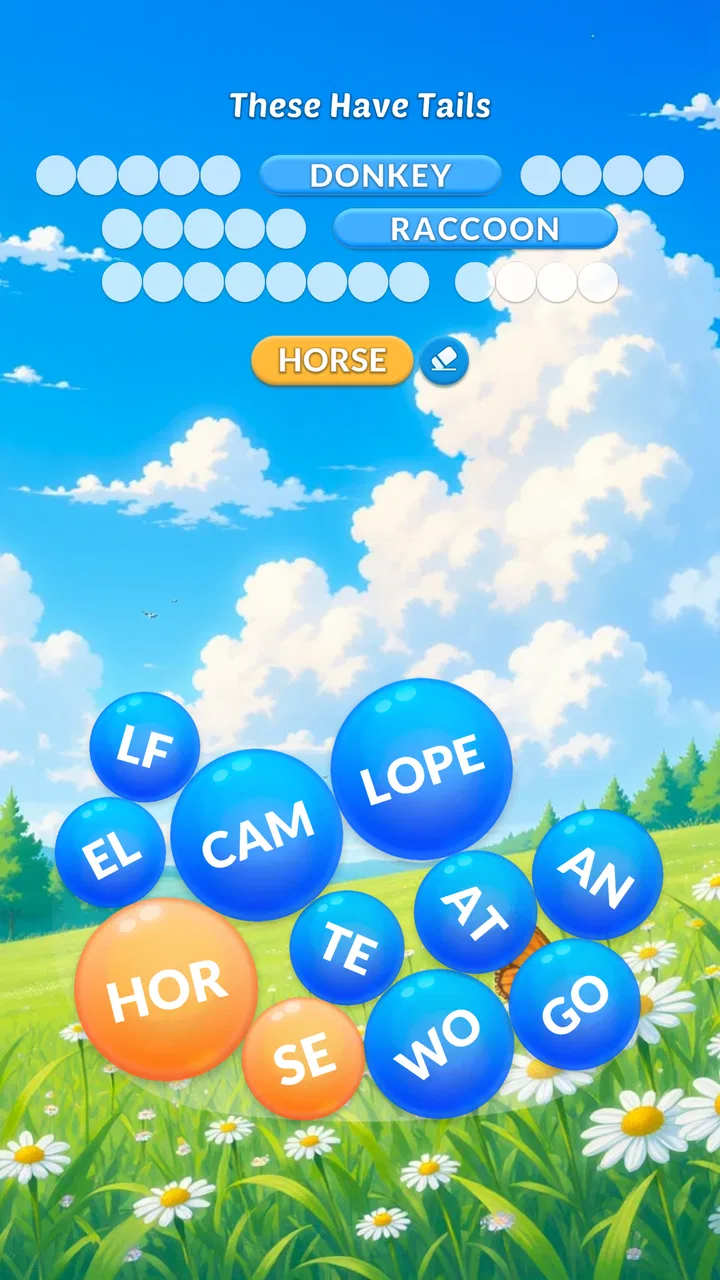
The biggest practical advantage is variety. A traditional word-search format is useful when I want something familiar and low-pressure, while a connect-style puzzle asks me to think more carefully about possible letter combinations. The crossword element gives the experience a slightly more deliberate rhythm. Instead of committing to one type of puzzle for the entire session, I can choose the format that matches my mood.
That matters in a realistic everyday situation. If I have a few minutes before an appointment, I can open the game and work through a straightforward search puzzle. When I have more patience later, I can switch to a crossword-like challenge and spend longer considering the clues and available letters. The app is therefore more flexible than a single-mode word game, even though players who strongly prefer one exact format may find the all-in-one approach less focused.
In my experience, the presentation is designed for immediate play rather than study. I do not need to learn complicated controls before attempting a puzzle. The familiar gestures and word-game conventions make the early experience approachable for people who already enjoy mobile puzzles, and the Everyone age rating also makes it a reasonable choice for mixed-age households.
What the three formats are good at
Word search is probably the easiest place to begin. It lets me scan, recognize patterns, and make progress without having to construct every answer from scratch. This mode works well when I want a calm mental warm-up, especially if I am tired and do not want a demanding puzzle immediately.
Connect puzzles feel more active because I have to test possible letter paths and decide whether a promising combination is actually useful. They can be satisfying when I spot a word that was hidden in plain sight, but they also expose one of the trade-offs of the collection: people who dislike trial and error may prefer the more direct search format.
The crossword-style option is the better choice when I want vocabulary and deduction to matter together. It encourages me to pause, compare possibilities, and use the surrounding puzzle as a guide. That makes it more mentally engaging than simply locating a visible word, but it can also feel slower when I only have a minute or two available.
The useful trick is to choose the mode according to your energy, not just your preferred genre. Search puzzles are a good entry point, connect puzzles suit active experimentation, and crossword play is better when I want a longer concentration session. Treating the app as three different tools makes it feel less repetitive.
Speed expectations and the value of low friction
I would describe the expected pace as casual rather than intense. This is not a word game built around rapid reactions or demanding action. The important question is how quickly I can get from opening the app to making a meaningful move. Because the formats are familiar, the learning curve is light, and that helps the game feel suitable for brief visits.
The current version is 8.3.10, so the app is not presented as an early experiment. Still, a version number does not tell me how it behaves on every phone. Older hardware may feel less immediate than a recent device, particularly if the phone is already busy with other applications. I would not choose this game expecting the same instant response as a minimalist offline puzzle, but its basic concept is naturally less demanding than a graphically heavy game.
There is also a psychological kind of speed here. Having several modes in one app reduces the time I spend deciding what to download next. That is a small convenience, but it becomes noticeable over repeated use. Instead of keeping separate word-search, crossword, and letter-connecting apps organized, I can open one title and select the kind of challenge I want.
What happens during heavier use
The most demanding moments are not likely to come from visual complexity. They come from extended sessions, repeated switching between puzzle types, and the general burden of keeping a game open while other apps are active. If I play for a long stretch, the experience becomes more about mental fatigue than technical intensity. The collection encourages “one more puzzle” behavior, so it is easy to spend longer with it than originally planned.
For battery-conscious players, I would approach it like any other mobile game: close unnecessary background apps, keep the operating system reasonably current, and avoid judging performance while the phone is already overloaded. The game is free to install, but free access does not automatically mean zero resource use or zero interruptions. A modest word game can still be inconvenient if the device has very little free storage or memory.
One practical workflow helps during longer sessions. I start with search puzzles to get comfortable, move to connect puzzles when I want more involvement, and finish with crossword play if I still have time. This rotation prevents the repetition that can appear when I stay in one format too long. It also gives each mode a clear purpose instead of making the app feel like a pile of similar activities.
Another useful habit is to stop after a puzzle that felt satisfying rather than continuing automatically. Because the app combines multiple formats, the next option is always close at hand. That is convenient, but it can also turn a short break into an unexpectedly long session. People looking for a tightly limited daily routine may prefer a single-puzzle app with a more obvious stopping point.
Reliability in normal use
For a game like this, reliability means more than avoiding crashes. I also want the puzzle state, controls, and transitions to feel predictable. Familiar word-game interactions help because there are fewer unusual mechanics to misunderstand. When the interface behaves as expected, I can concentrate on vocabulary instead of wondering whether I made an incorrect gesture.
I would still keep expectations sensible. Any mobile game can be affected by an aging operating system, limited device memory, or interruptions from calls and notifications. Since the minimum requirement is Android 7.0, the app is accessible to a broad range of Android devices, but compatibility does not promise identical smoothness across every model. A newer phone will generally give the app more room to operate comfortably than an older handset with many background tasks.
Recovery is especially important when I am interrupted halfway through a puzzle. I prefer not to lose progress after switching briefly to a message or another task. The safest approach is to treat the game as a casual session rather than a place for a long, uninterrupted campaign. If I know I may need to leave suddenly, I choose a puzzle that I can reasonably finish or pause at a natural point.
That advice is not a criticism unique to this title; it is a sensible way to use any short-session word game. The difference here is that the variety makes it tempting to begin another mode immediately after an interruption. I would avoid opening it during a situation where I need guaranteed continuity, such as an important work task or a timed appointment.
Device constraints and purchase considerations
The Android requirement of 7.0 or later makes Word Carnival usable on many older phones, which is helpful for families or players who do not upgrade frequently. At the same time, an older supported operating system can be paired with hardware that varies widely in memory and responsiveness. If your phone already struggles with ordinary apps, I would not assume that the game will feel perfectly fluid simply because the operating system qualifies.
Storage space is another everyday consideration. The game itself is centered on words rather than large 3D environments, so I would expect its demands to be more modest than those of a modern action game. Even so, keeping some free space available is sensible because crowded storage can make any app less pleasant to use. I would install it on a device that has enough breathing room rather than treating the minimum operating-system requirement as a complete performance guarantee.
The game is free, with optional in-app purchases ranging from $0.99 to $99.99 per item. That wide range makes it important to pay attention during use, particularly if the phone is shared with children. The Everyone rating describes the intended age suitability, but it does not remove the need for sensible purchase controls on the device. I appreciate being able to try the core experience without paying upfront, yet users who want a completely purchase-free environment should be cautious.
Compared with a traditional paper crossword book or a dedicated offline word-search app, this title offers more variety in one installation. The trade-off is that a paper book has no battery concern and no in-app purchase path, while a single-purpose offline app may feel more focused. Compared with large, competitive word-game platforms, Word Carnival is more appealing to me when I want relaxed variety rather than a social ranking system or a highly specialized competitive routine.
Who will enjoy it most
I would recommend it to casual players who like vocabulary puzzles but do not want to choose one format permanently. It is also a good fit for someone who uses games as a gentle mental break: the search mode can be approachable, the connect mode adds experimentation, and the crossword mode provides a more thoughtful challenge. Families may appreciate the Everyone rating, provided adults manage purchases appropriately.
It can also suit learners who want to spend spare moments noticing spelling patterns and testing vocabulary. I would not present it as a formal language-learning course, because its purpose is entertainment rather than structured instruction. Still, switching among different word formats can encourage a broader kind of word awareness than repeating the same grid every day.
The app is less suitable for players who want deep crossword construction, a strictly competitive leaderboard experience, or a completely distraction-free puzzle tool. Someone who already owns a favorite specialist crossword app may find the included crossword mode less compelling than that dedicated alternative. Likewise, a player who only wants word search may prefer a simpler app that does not ask them to navigate through several formats.
Small strategies that improve the experience
My first recommendation is not to judge the whole game from one mode. If the opening search puzzles feel too easy, try the connect or crossword-style sections before deciding that the app lacks challenge. The reverse is also true: if a crossword feels demanding during a short break, switching to search play can preserve the relaxing side of the experience.
Second, use the app as a vocabulary rotation rather than a single endless stream. Spend a few sessions noticing which mode keeps your attention without making you feel rushed. That tells you whether the all-in-one design is genuinely useful or merely adding choices. The app’s strongest feature is not that it contains several formats on paper; it is that the formats can serve different moments in a normal day.
Third, be deliberate with purchases. Since the game is free to start and individual items can reach $99.99, I would review the device’s purchase protections before handing it to a child or leaving it unlocked during a family session. This is one of those practical details that matters more than the store summary when deciding whether the game belongs on a shared phone.
My performance verdict
Word Carnival works best as a flexible, low-pressure word-game collection. Its speed expectations are modest and appropriate for casual play, its variety reduces the need to maintain several similar apps, and its broad Android compatibility makes it accessible to many users. I would not call it the ideal specialist tool for every format, but that is not really its purpose.
My main reservations are the usual ones for a free mobile game with optional purchases: the experience may vary between older and newer devices, longer sessions can become repetitive, and users should pay attention to purchase controls. Those points do not cancel out its strengths, but they do shape who should install it.
With an average rating of 4.6 and around 1.3 thousand written reviews, it has earned a generally positive reception, while its install count of over 500 thousand shows that the concept has reached a substantial casual audience. I see that as supporting evidence rather than a reason to install blindly. The better question is whether you want three familiar word-game styles in one convenient place.
For me, the answer is yes when I want a quick mental diversion that can change pace without changing apps. I would recommend it to friends who enjoy word searches, letter connections, and crossword-like puzzles in equal measure. If you want a focused specialist experience, a paper puzzle book, or a purchase-free environment above all else, another option may suit you better. Otherwise, Word Carnival - All in One is a practical free download whose best quality is the freedom to match the puzzle to the moment.
FAQs for Word Carnival - All in One
01What is Word Carnival - All in One?
Word Carnival - All in One is a casual word-game collection designed to provide several puzzle experiences in one app. Players can typically expect vocabulary challenges, letter-based puzzles, and progressively harder levels that test spelling, recognition, and general word knowledge. Its variety makes it suitable for short sessions, although the exact games and available features may depend on the version installed and the developer’s updates.
02How do you play Word Carnival - All in One?
Gameplay is generally based on solving word-related challenges by arranging letters, finding hidden words, completing clues, or selecting the correct answers. Each mode may use slightly different rules, so new players can usually learn by following the in-game instructions and tutorial prompts. The difficulty tends to increase as you advance, making the app accessible for beginners while still offering more demanding puzzles for experienced players.
03Can Word Carnival - All in One be played offline?
Some parts of Word Carnival - All in One may work without a continuous internet connection, especially previously loaded single-player puzzles. However, an internet connection can still be required for downloading additional levels, displaying advertisements, synchronizing progress, receiving updates, or accessing online features. Before traveling or playing offline, it is best to launch the game while connected and confirm which content remains available without internet access.
04Is Word Carnival - All in One free to download and play?
Word Carnival - All in One may be available as a free download, but free access does not always mean that every feature is completely unrestricted. The app can include advertisements, optional purchases, extra content, or limitations that can be removed through payment. Check the listing for your Android or iOS device carefully, including the in-app purchase information, before downloading or allowing children to use the application.
05Is Word Carnival - All in One suitable for children and language learners?
The word-based format can make Word Carnival - All in One useful for children, casual players, and people who want to practice vocabulary in an entertaining way. Nevertheless, suitability depends on the player’s reading level, the language used in the puzzles, advertising content, and any purchase options. Parents should review the store rating, privacy details, and in-app settings before giving younger users unrestricted access.
Pros
- Includes multiple word game modes in one app.
- Short rounds make it easy to play during quick breaks.
- Helps build vocabulary through varied word challenges.
- Simple controls are suitable for casual players.
- Offline play may be convenient when internet access is limited.
Cons
- Frequent ads can interrupt the gameplay experience.
- Some levels may feel repetitive after extended play.
- Hints and extra help can depend on limited in-game resources.
- Difficulty may vary noticeably between different game modes.
- Progress or rewards may require patience and repeated play.

Word Carnival - All in One
Gallery